Gathering entries
Discover Your Health age was designed to be operated by a health expo volunteer, not directly by visitors. Visitors fill out a paper questionnaire, and then the volunteer uses the software to print or email a health age report. With a crowded health expo, entering data into the computer is usually the bottleneck so we have included several features to make it as fast as possible. If you have feedback as to how to save time and streamline the process, please let us know since this is a priority.
How to fill out the report
When you use the program for the first time a blank survey page will appear:
Fill out the name, gender, age, weight, and height. It's very important to include units with the weight and height, otherwise the BMI will not be calculated. If entered correctly, it should look something like this:

Notice that the BMI value appears in gray when a valid weight and height have been entered.
Finish the survey by answering the questions and filling out any additional interests below. If the survey was filled out completely, the calculated healthage will appear in a white box at the bottom of the survey:

Now you're ready to print a report! (or email)
The Sidebar
All the entries you create will be listed in the sidebar. To review a previous entry, click on the name in the sidebar.
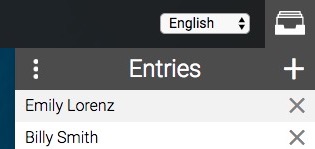
You can show and hide the sidebar by clicking on the filing cabinet icon above the sidebar.
Speed tips
The speed at which you can process visitors is usually determined by how fast you can enter their data into the computer. That in turn is determined by how fast you can click and scroll. Unfortunately, there is a limit to how fast a human can click. To make things faster, we've included keyboard shortcuts so you can fill out the report without using the mouse:
- Move to the next field with the Tab key
- Move to the previous field by typing Shift+Tab
Once a field is highlighted, there are shortcuts to select a specific option:
- Select Male or Female gender with the arrow keys
- Use the number keys to answer a survey question
- Use the letters on your keyboard to select an interest
Other Notes
- The name and gender fields are only to personalize the report and don't impact the calculations.
- The age field is required. No health age will be shown if it is left blank.
- The height and weight fields are to calculate BMI. This will be used to prefill the "how is your weight" question with a more accurate answer than what the visitor might give.